
Section Homework 7

Before you begin ...

Permitted MATLAB Functions & Commands for Homework 7.

The following built-in MATLAB functions and commands are permitted for this assignment.
Vector/Matrix
Operations:
round โ€ข mod โ€ข floor โ€ข ceil
Size/Dimensions:
length โ€ข numel โ€ข size โ€ข height โ€ข width
Creation:
zeros โ€ข ones โ€ข true โ€ข false
Stats:
sum โ€ข max โ€ข min โ€ข mean โ€ข std
Logical:
all โ€ข any
Flow Control
Conditional:
if โ€ข switch-case โ€ข try-catch
Loops:
for โ€ข while โ€ข continue โ€ข break โ€ข return
Strings and Character Arrays
Operations:
join โ€ข replace
Conversion:
num2str โ€ข str2num โ€ข str2double โ€ข string โ€ข char
Other
Printing Text:
fprintf โ€ข disp โ€ข display โ€ข input โ€ข assert
Random Generators:
rand โ€ข randi โ€ข rng
Special Variables:
nargin
Type Detection:
isnan โ€ข isfield โ€ข isempty
Points will be deducted from any programs using functions outside this list.

Summary.

In this final project you will design and implement your own version of the classic Minesweeper game in MATLAB. The game is played on a square grid of tiles. Some tiles conceal mines, while others are safe. On each move, the player chooses a tile to remove: if it reveals a mine, the game is over; other you are safe and can choose another tile. As safe tiles are revealed, you will be given clues as to how many mines are adjacent to any revealed space.
You will implement a graphical user interface (GUI) using a MATLAB figure and built-in mouse-click triggers that call your helper functions to perform various tasks to progress the game. Behind the scenes, you will organize and track the game data and use helper functions to manage the game logic.
The functions marked with \(^{๐Ÿ†}\) are additional features that can earn you some bonus credit.
The complete will be submitted as a single, self-contained MATLAB file. All of the helper functions it depends on are defined in the same file.
If you are having trouble with one or more of the helper functions below, you may download this zip-file of the Helper Keys.
Minesweeper and helper function guidelines:
  • At minimum, you must turn in minesweeper.m.
  • You must turn in a 100% working Minesweeper game.
  • To reach this, you may drop-in and use as many helper keys as you need to make the game work.
  • Technically, you could just write minesweeper.m and decide to use every helper key.
  • Your final score on this project depends on how many of your own helpers were used in the final working game.
  • Do not submit buggy helpers. If they return errors, opt to use drop-in helper keys.
  • Fully test your submitted minesweeper. If it returns an error on my end, you will receive a zero. To avoid this situation, run the game in an isolated folder with a cleared workspace. If the game runs without error, then it will run without error on my end.

Subsection \(๐Ÿค\) init_settings

Description.

(Difficulty: โ˜…โ˜†โ˜†โ˜†โ˜†) Creates and returns the configuration structure for a single run of Minesweeper. This helper determines all difficulty-dependent values, including grid size, mine density, time limit, figure position, icon choices, font sizes, colors, and explosion timing, which remain fixed throughout the game.

Signature.

settings = init_settings(difficulty)
difficulty
\((1\times 1)\) string
Difficulty level controlling board size, mine density, time limits, and figure layout. Valid choices: โ€œtestโ€, โ€œeasyโ€, โ€œnormalโ€, โ€œhardโ€, or anything else (treated as a โ€œbrutalโ€ mode).
settings
\((1\times 1)\) struct
Full configuration for the game, containing board parameters, mine count, figure position, icon strings, text sizes, color matrix, time-limit settings, and explosion timing.

Specifications.

  • Use a switch statement on difficulty to assign:
    • gridSize โ€” number of tiles per side.
    • pctMines โ€” mine percentage for the selected difficulty.
    • timeLimit โ€” countdown duration in seconds (โ€œinfโ€ means no timer).
    The default (otherwise) case uses the brutal settings.
  • The built-in difficulty presets are:
    Mode Grid Size Mine Fraction Time Limit
    โ€œtestโ€ \(5\times 5\) \(0.10\) \(30\) seconds
    โ€œeasyโ€ \(10\times 10\) \(0.10\) โ™พ๏ธ (no timer)
    โ€œnormalโ€ \(15\times 15\) \(0.13\) \(160\) seconds
    โ€œhardโ€ \(20\times 20\) \(0.16\) \(100\) seconds
    โ€œbrutalโ€ (default) \(20\times 20\) \(0.18\) \(80\) seconds
  • Compute the total number of mines using pctMines and gridSize. Make sure to round this number to the nearest integer.
  • The settings struct must contain the following fields:
    gridSize
    \((1\times 1)\) integer
    Number of tiles on each side of the board.
    figPosition
    \((1\times 4)\) double
    Figure position vector \([x_0, y_0, w, h]\) used by init_gui to size and place the window. In the provided implementation, the width w scales with gridSize so that tiles remain roughly square.
    nMines
    \((1\times 1)\) integer
    Total number of mines on the board.
    icons
    \((1\times 1)\) struct
    Emoji-based icons used throughout the GUI:
    These are consumed by init_gui, update_zoneLabels, and the explosion animation.
    sizes
    \((1\times 1)\) struct
    Font sizes for different GUI elements:
    colors
    \((8\times 3)\) double
    RGB colors for the numbers \(1\) through \(8\) on revealed tiles. The default palette is designed to resemble classic Minesweeper colors.
    timeLimit
    \((1\times 1)\) double
    Maximum time, in seconds, for the game. Use inf for no time limit (for example, on โ€œeasyโ€).
    explosionDelay
    \((1\times 1)\) double
    Pause between clicking a mine and beginning the explosion animation (Tier 3 feature). The demo uses \(3.5\) seconds.
  • Regardless of whether you complete the ๐Ÿ† features, all of the fields described should be present in your settings output.

Helpers Used.

Examples.

% Example 1 โ€” Normal difficulty
settings = init_settings("normal");
settings.gridSize		% returns 15
settings.nMines			% returns round(0.13 * 225)
settings.timeLimit		% returns 160
size(settings.colors)	% returns [8 3]
settings.figPosition	% 1x4 vector for the figure position
% Example 2 โ€” Unrecognized difficulty โ†’ Brutal mode
settings = init_settings("banana");
settings.gridSize		% returns 20
settings.nMines			% returns 72
settings.timeLimit		% returns 80
settings.explosionDelay	% default: 3.5 seconds

Subsection \(๐Ÿค\) init_state

Description.

(Difficulty: โ˜…โ˜†โ˜†โ˜†โ˜†) Creates and returns a fresh game-state structure for a minesweeper game. The values defined in this helper function represent the variables that can change and must be tracked during the course of a game.

Signature.

state = init_state(n)
N
\((1 \times 1)\) integer
Number of tiles on one side of the game grid.
The full board has an \(N \times N\) grid of tiles (\(N^2\) total tiles).
state
\((1 \times 1)\) struct
Initial game state structure with all fields set to their default values. See details below.

Specifications.

  • This helper builds a struct that stores the (possibly changing) values of current game: mine locations, revealed tiles, flagged tiles, etc..
  • The fields of state are described and initialized as follows:
    isMine
    \((N \times N)\) logical โžŸ Default: all false
    Indicates if the \((r,c)\)-tile hides a Mine.
    minesNearBy
    \((N \times N)\) integer โžŸ Default: all 0
    Number of Mines touching the \((r,c)\)-tile (up to 8).
    flagged
    \((N \times N)\) logical โžŸ Default: all false
    Indicates if the \((r,c)\)-tile is flagged.
    revealed
    \((N \times N)\) logical โžŸ Default: all false
    Indicates if the \((r,c)\)-tile has been revealed.
    gameStarted
    \((1 \times 1)\) logical โžŸ Default: false
    Signals that the first tile has been clicked.
    gameOver
    \((1 \times 1)\) logical โžŸ Default: false
    Signals if the game is over (win, loss, or time-out).
    playerWon
    \((1 \times 1)\) logical โžŸ Default: false
    Signals if the player has successfully cleared the board.
    startTime
    \((1 \times 1)\) double โžŸ Default: 0
    Starting time stamp (returned by tic) after first-click.
    timesUp
    \((1 \times 1)\) logical โžŸ Default: false
    Signals if the time limit has been reached.
  • Regardless of whether you complete the ๐Ÿ† features, all of the fields described should be present in your settings output.

Helpers Used.

Examples.

% Example 1: Small grid
state = init_state(2);

% Check a few sample values:
state.isMine			% โ† 2x2 logical with all false
state.minesNearBy		% โ† 2x2 with all 0
state.flagged			% โ† 2x2 logical with all false
state.revealed			% โ† 2x2 logical with all false
state.gameStarted		% โ† false
state.startTime			% โ† 0
state.playerWon			% โ† false
% Example 2: Large grid
state = init_state(18);

% Check a few sample values:
size(state.isMine)	% โ† [18 18]
state.minesNearBy	% โ† 18x18, all 0
state.gameOver		% โ† false

Subsection \(๐Ÿค\) init_gui

Description.

(Difficulty: โ˜…โ˜…โ˜…โ˜…โ˜†) Creates the Minesweeper figure window and initializes all of the graphics objects (tiles, labels, flags, reset icon, and timer label) that make up the visual components of the game. This helper lays out the board but does not place any mines or compute game logic.
The function returns both the configured figure and a gui structure containing all on-screen components.

Signature.

[gui, fig] = init_gui(settings)
settings
\((1\times 1)\) struct
Configuration structure returned by init_settings. In particular, this helper uses settings.gridSize, settings.figPosition, settings.icons, settings.sizes, and settings.timeLimit.
gui
\((1\times 1)\) struct
Collection of all graphical components used by the game. See below for its fields.
fig
\((1\times 1)\) figure
Main Minesweeper figure window that will be used to store the game structure via guidata.

Specifications.

  • The goal of this helper is two-fold:
    • Construct the gui structure that stores handles to all onโ€“screen components.
    • Set up a configured figure window fig that contains the Minesweeper board.
  • This helper is responsible only for the visual layout and assigning which functions will be called when a component is clicked. It does not place any mines, compute proximity numbers, or check win/loss conditions.
  • You will need the following values from settings:
    gridSize โ€” figPosition โ€” icons โ€” sizes
  • GUI components:
    zoneLbls
    \((N\times N)\) text
    Text label displaying the mine counts or mine icons.
    Minimum Properties:
    tiles
    \((N\times N)\) text
    Text label displaying the tile icons.
    Minimum Properties:
    flags
    \((N\times N)\) text
    Text label displaying flag icons drawn on top of tiles.
    Minimum Properties:
    resetButton
    \((1\times 1)\) text
    Text label displaying the reset icon below the grid.
    Minimum Properties:
    resultsLabel
    \((1\times 1)\) text
    Status text used to show feedback at the end of the game.
    Minimum Properties:
    timeLabel \(^{๐Ÿ†}\)
    \((1\times 1)\) text
    Text label used to display remaining time.
    Minimum Properties:
    • Position โžŸ below the grid
    • String โžŸ "Time: " + timeLimit or "Time: โ™พ๏ธ"
    • FontSize โžŸ label size
    • HorizontalAlignment โžŸ left
    • Visible โžŸ true
  • Use a nested loop to initialize zoneLbls, tiles, and flags matrices as described above. Before you do, preallocate them with gobjects(N, N).
  • Set up the figure window as follows (up to minor cosmetic changes):
    fig = figure;
    fig.Position = position;
    fig.ToolBar  = "none";
    fig.MenuBar  = "none";
    title("Mine Sweeper", "FontSize", 18)
    xlim([1 N+1]); ylim([1 N+1]);
    axis off
    axis square
    axis ij     % orients the positive y-axis downward
    
  • After calling init_gui, the board should show an \(N\times N\) array of covered tiles, a reset icon, and empty status/timer labels. Mines and numbers remain hidden until other helpers update them.

Helpers Used.

Examples.

% Create an "easy" Minesweeper GUI.
settings = init_settings("easy");
[gui, fig] = init_gui(settings);
% The window should show a 10-by-10 grid of covered tiles,
% a reset icon, and a timer label reading either "Time: โ™พ๏ธ"
% or a numeric time, depending on the difficulty.

Subsection \(๐Ÿค\) get_neighbors

Description.

(Difficulty: โ˜…โ˜…โ˜…โ˜†โ˜†) Returns all valid neighboring tile locations surrounding a given tile \((r,c)\) on an \(N \times N\) Minesweeper grid. A tile can have up to eight neighbors, but fewer on edges and corners. This helper is used throughout the project whenever the game must inspect or reveal adjacent tiles, such as during mine-count computation or flood-fill revealing.
The function returns a list of rowโ€“column pairs, each representing one valid neighbor, and excludes the center tile itself.

Signature.

neighbors = get_neighbors(r, c, N)
r
\((1\times 1)\) integer
Row index of the tile being inspected.
c
\((1\times 1)\) integer
Column index of the tile being inspected.
N
\((1\times 1)\) integer
Number of tiles along one side of the square grid.
neighbors
\((K \times 2)\) integer matrix
Each row is a valid neighbor coordinate \((\text{row}, \text{col})\text{,}\) where \(K = 3, 5,\) or \(8\) depending on whether \((r,c)\) is on a corner, edge, or interior tile.

Specifications.

  • The task of this helper is to return all neighboring grid locations adjacent (horizontally, vertically, or diagonally) to tile \((r,c)\text{.}\)
  • The output matrix has exactly one row per neighbor, and each row contains \([\text{row}, \text{col}]\text{.}\)
  • This helper does not inspect Mines, flags, or reveal status. It is purely geometric and is reused by several other helpers, including:
    • get_mineCounts โ€” to count Mines in adjacent cells,
    • reveal_tiles โ€” to propagate a flood-fill reveal,
    • any logic that requires adjacency relationships.

Helpers Used.

Examples.

% Example 1: Corner tile on a 5ร—5 board
neighbors = get_neighbors(1, 1, 5)
% Expected: three neighbors
%     1		2
%     2		1
%     2		2
% Example 2: Center tile on a 10ร—10 board
neighbors = get_neighbors(5, 5, 10)
% Expected: eight neighbors
%     4 	4
%     4 	5
%     4 	6
%     5 	4
%     5 	6
%     6 	4
%     6 	5
%     6 	6

Subsection \(๐Ÿค\) get_mines

Description.

(Difficulty: โ˜…โ˜…โ˜…โ˜†โ˜†) Randomly places Mines on the board while guaranteeing that the playerโ€™s initial click is safe. This helper fills g.state.isMine with a random Mine layout that uses exactly g.settings.nMines Mines on an \(N \times N\) grid and avoids the tile at (initRow, initCol).

Signature.

mines = get_mines(g, initRow, initCol)
g
\((1 \times 1)\) struct
Game structure containing:
  • settings โ€” as defined in init_settings (uses gridSize and nMines).
  • state โ€” as defined in init_state (uses isMine).
  • gui โ€” not used.
  • clock โ€” not used.
initRow
\((1 \times 1)\) integer
Row index of the tile where the player first clicked.
initCol
\((1 \times 1)\) integer
Column index of the tile where the player first clicked.
mines
\((N \times N)\) logical
mines(r,c) = true if there is a mine there. Otherwise, false.

Specifications.

  • The task of this helper is to randomly generate and place Mines on the board while avoiding the initial safe click at (initRow, initCol).
  • Use the configuration from g.settings:
    • N = g.settings.gridSize โ€” board dimension.
    • M = g.settings.nMines โ€” total Mines to place.
  • Implement Mine placement using a rejection-sampling loop:
    • Begin with a logical matrix mines of size \(N \times N\) initialized to false.
    • Temporarily mark the initial click location as blocked: mines(initRow, initCol) = true.
    • For k = 1:M, repeatedly generate random row/column indices using randi(N) until you find a location that does not already contain a Mine.
    • Place a Mine there by setting mines(row, col) = true.
  • After all Mines are placed, clear the temporary block at (initRow, initCol) by setting mines(initRow, initCol) = false.
  • Finally, assign the completed layout back into the game structure: g.state.isMine = mines.

Helpers Used.

Examples.

% Setup a reproducible testing environment:
rng(7,"twister");
g.settings = init_settings("easy");
g.state    = init_state(g.settings.gridSize);

% Example: Player clicked the (row=7, col=5) location
clickedRow = 7;
clickedCol = 5;
mines = get_mines(g, clickedRow, clickedCol);

% Check:
%   - mines is a 10x10 logical array.
%   - Exactly g.settings.nMines entries are true.
%   - mines(7,5) is false.

Subsection \(๐Ÿค\) get_mineCounts

Description.

(Difficulty: โ˜…โ˜…โ˜…โ˜†โ˜†) Computes, for every tile on the board, how many Mines appear in its neighboring cells. The result is stored in g.state.minesNearBy as an \(N \times N\) array of counts, where each entry records the number of Mines in the 8 surrounding tiles (or fewer on edges and corners).

Signature.

counts = get_mineCounts(g)
g
\((1 \times 1)\) struct
Game structure containing the following fields:
counts
\((N \times N)\) integer
counts(r,c) = number of mines adjacent to the (r,c) space.

Specifications.

  • The task of this helper is to compute the proximity numbers on the game board as an \(N \times N\) integer matrix and store it in g.state.minesNearBy.
  • This helper assumes that the Mine layout g.state.isMine has already been generated by get_mines.
  • Use nested loops to scan through each (r,c)-tile on the grid.
  • For each (r,c)-tile:
    • If there is a mine there, skip it.
    • Otherwise, count the number of mines in the surrounding \(3 \times 3\) area.
    • Ignore the center tile itself.
  • Be careful not access values outside the bounds of the matrix.

Helpers Used.

get_neighbors

Examples.

% Example 1: Compute mine counts on a small test board.
% Setup a small test board:
g.settings = init_settings("test");
g.state = init_state(g.settings.gridSize);

% First, hardcode some mine locations:
g.state.isMine = [ ...
		true	true	false   false   false; ...
		true	false   false   false   false; ...
		false   true	true	false   true; ...
		false   false   false   false   true; ...
		false   true	false   false   true; ...
];
% View the mines as 1s and 0s:
g.state.isMine
% Returns: 
%	5x5 logical array
%	  1   1   0   0   0
%	  1   0   0   0   0
%	  0   1   1   0   1
%	  0   0   0   0   1
%	  0   1   0   0   1
Now compute the mine counts surrounding these mines:
counts = get_mineCounts(g)
% Returns:
% counts =
%	  0   0   1   0   0
%	  0   5   3   2   1
%	  2   0   0   3   0
%	  2   3   3   4   0
%	  1   0   1   2   0

Subsection \(๐Ÿค\) update_zoneLabels

Description.

(Difficulty: โ˜…โ˜…โ˜†โ˜†โ˜†) Uses the current game state to fill in the text and color for every tile label in the Minesweeper board. This helper does not change which tiles are revealed; instead, it assigns each label either a Mine icon, a proximity number, or leaves it blank so that the covering tiles in g.gui.tiles can reveal them during play.

Signature.

new_g = update_zoneLabels(g)
g
\((1 \times 1)\) struct
Game structure containing:
  • settings โ€” uses gridSize, icons, and colors.
  • state โ€” uses isMine and minesNearBy.
  • gui โ€” uses zoneLabels.
  • clock โ€” not used.
new_g
\((1 \times 1)\) struct
Same as g, except g.gui.zoneLabels is updated to show the correct Mine icons and proximity numbers.

Specifications.

  • The task of this helper is to update the text labels inside g.gui.zoneLabels with either a Mine icon or a Mine-proximity number for each tile.
  • An optional, but helpful step is to extract the data needed in this helper:
    • N = g.settings.gridSize
    • icons = g.settings.icons (especially icons.mine)
    • colors = g.settings.colors โ€” the 8 colors for numbers 1-8
    • isMine = g.state.isMine
    • values = g.state.minesNearBy
  • Loop over the entire grid:
    • Update each zoneLabel so that it contains a number or a mine.
    • Use the colors defined in g.settings.colors to set the number colors.
  • After calling this helper, all labels are fully initialized and will not change for the rest of the game. However, the player will not see them until the corresponding tile in g.gui.tiles is hidden by other helpers.

Helpers Used.

Examples.

% Setup a minimal test environment:
rng(77,"twister");
g.settings = init_settings("easy");
g.state	= init_state(g.settings.gridSize);
[g.gui, fig] = init_gui(g.settings);

% Build a Mine layout and proximity numbers:
g.state.isMine = get_mines(g, 4, 5);
g.state.minesNearBy = get_mineCounts(g);

% Example: update labels, then delete tiles to reveal them all at once:
g = update_zoneLabels(g);
delete(g.gui.tiles) 	% โš ๏ธ This is a quick way to remove all  
						% tiles, do not do this in your assignment!
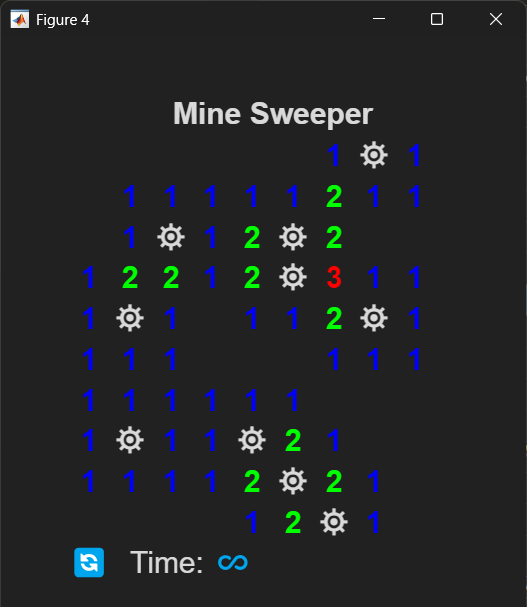
After running the above commands, you should see something similar to:

Subsection \(๐Ÿค\) reveal_tiles

Description.

(Difficulty: โ˜…โ˜…โ˜…โ˜…โ˜…) Reveals a connected region of safe tiles starting from a clicked position \((r,c)\text{.}\) This helper performs a search from the initial tile to uncover all non-mine, non-flag tiles that should become visible after a safe left-click. It updates state.revealed and hides the covering tiles in gui.tiles, but it does not modify mine locations, flags, timers, or game-over status.

Signature.

new_g = reveal_tiles(g, r, c)
g
\((1 \times 1)\) struct
Game structure containing the fields:
r
\((1 \times 1)\) integer
Row index of the tile where the player clicked.
c
\((1 \times 1)\) integer
Column index of the tile where the player clicked.
new_g
\((1 \times 1)\) struct
Same as g, except g.state.revealed and g.gui.tiles are updated.

Specifications.

  • The task of this helper is to visually reveal the tiles that should become visible after a safe left-click and to update the revealed matrix to match what the player sees. Below are general hints for implementing this logic.
  • Begin by setting up a logical (true/false) matrix (with the same size as the grid) that flags the tiles have already been visited. This will be used to prevent adding the same location to the โ€œexploration queueโ€.
  • \(\textbf{Exploration Queue}\text{.}\) We will store row & col locations in two column matrix. This list of locations will be called the explore_queue.
  • Each row of explore_queue is a pair [row col].
  • Place the location of the clicked tile in the queue and flag it as visited.
  • As long as the queue is not empty, we โ€œprocessโ€ the FRONT of the queue.
  • \(\textbf{Processing the queue}\text{.}\) Processing the queue involves the following steps:
    • Get the first row [r c] in the queue. This is our current location.
    • Delete the first row (current location) from the queue.
    • Reveal the tile (via the gui struct) at the current location if is neither flagged nor hiding a mine.
    • If the current location has no nearby mines, then get its neighbors.
    • \(\textbf{Add new neighbors to the queue}\text{.}\) For each neighbor that
      1. has not been visited,
      2. is not flagged, and
      3. does not have a mine,
      add that neighbor to the queue and mark it as visited.
    • Continue โ€œprocessing the queueโ€ as long as it has locations.
  • Note: Only reveal the front of the queue (current location), not the neighbors. The neighbors will all get to the front of the queue eventually.
  • This search reveals an entire connected region of zeros and also reveals the nonzero tiles that border that region (since they are processed once but do not generate further neighbors).
  • This helper does not check win or loss conditions and does not start or stop the timer.

Helpers Used.

get_neighbors

Examples.

% After the first click at (r, c), and assuming the board is built
% and g.state.minesNearBy has been computed:

g = reveal_tiles(g, r, c);

% Now g.state.revealed marks all tiles that should be visible, and
% the corresponding rectangles in g.gui.tiles have been hidden so the
% underlying labels show through.

Subsection \(๐Ÿค\) game_over_screen

Description.

(Difficulty: โ˜…โ˜…โ˜†โ˜†โ˜†) Handles the end-of-game display logic. This helper stops the game timer, chooses the appropriate status message (โ€œYou Won!โ€, โ€œYou Lost! Better luck next time.โ€, or โ€œTimeโ€™s up!โ€), and, in loss situations, triggers the explosion animation that reveals the board in a dramatic way.

Signature.

new_g = game_over_screen(g, r, c)
g
\((1 \times 1)\) struct
Game structure containing settings, state, gui, & clock.
r
\((1 \times 1)\) integer
Row index of the last tile clicked.
c
\((1 \times 1)\) integer
Column index of the last tile clicked.
new_g
\((1 \times 1)\) struct
Same as g, with the timer stopped & new g.gui.resultsLabel.

Specifications.

  • The task of this helper is to finalize the game visually and logically: stop the countdown clock and send a clear end-of-game message to the player via the GUI.
  • As its first action, this helper should stop the countdown timer by calling stop(g.clock). This prevents further time-limit checks after the game is over.
  • The rest of the behavior depends on whether the player won or lost.
  • After calling this helper, the game is visually and logically finished. The player should not be able to continue play; the only meaningful actions are to click the reset button (to start a new run) or to close the game window.

Helpers Used.

explosion_animation

Examples.

% Setup a minimal testing environment:
rng(77,"twister");
g.settings = init_settings("easy");
g.state	= init_state(g.settings.gridSize);
[g.gui, fig] = init_gui(g.settings);
g.clock   = init_clock(fig);

% Example 1: Player Won
g.state.playerWon = true;
g = game_over_screen(g, 2, 2);

% Example 2: Player Lost - Clicked on a Mine
g.state.playerWon = false;
g.state.timesUp   = false;
g = game_over_screen(g, 4, 5);

% Example 3: Time-out Loss & Explosion from center (Tier 3)
g.state.playerWon = false;
g.state.timesUp   = true;
g = game_over_screen(g, 1, 1);

Subsection \(\text{๐Ÿ–ฑ๏ธ}\) reset_game

Description.

(Difficulty: โ˜…โ˜…โ˜†โ˜†โ˜†) Resets the game back to its starting state without rebuilding the figure window. This helper:
  • reinitializes the game-state structure,
  • restores all GUI tiles, flags, and labels to their defaults,
  • resets the timer display to the full time limit, and
  • stops any running countdown clock (Tier 3 feature).
It is triggered when the player clicks the reset icon (๐Ÿ”„) in the GUI.

Signature.

reset_game(fig)
fig
\((1\times 1)\) figure
Main game figure that contains the GUI components and stores the game struct via guidata.
None
No direct output, but it modifies the game data stored in fig and saves the updated game struct via guidata.

Specifications.

  • The primary goal of this helper is to reinitialize both the state and visible gui back to their starting values without constructing a new figure window.
  • Begin by retrieving the current game structure.
  • The state structure can be reset by calling init_state.
  • Since the gui components already exist, donโ€™t call init_gui. Instead, reset their properties in-place. Use a nested loop for the matrix components.
  • If your game includes a timer, be sure to stop the countdown clock and update the timeLabel to its initial value.\(^{๐Ÿ†}\)
  • Since this is mouse-click event callback, you need to extract the current game state from the figure.
  • Before leaving, save the updated game structure back into the figure.

Helpers Used.

init_state

Examples.

Test this in-game. Try pressing the reset icon (๐Ÿ”„) during various stages of the game and verify:
  • all tiles are covered again,
  • all flags are hidden,
  • the status label is cleared, and
  • the timer display has been reset to the full time limit.
You can also place a debug breakpoint inside this helper to ensure it is called when you click ๐Ÿ”„.

Subsection \(\text{๐Ÿ–ฑ๏ธ}\) clicked_on_tile

Description.

(Difficulty: โ˜…โ˜…โ˜…โ˜…โ˜†) Handles all mouse clicks on the Minesweeper board. This is the main controller for the game since it decides whether to reveal or flag a space, including building the board on the very first click, revealing regions of safe tiles, managing flags, and ending the game when the player wins or hits a Mine.

Signature.

clicked_on_tile(src, event, fig)
src
\((1 \times 1)\) MATLAB graphics object (struct with many fields)
The GUI component that received the click. In this game, that is either a tile (g.gui.tiles(r,c)) or a flag (g.gui.flags(r,c)).
evt
\((1 \times 1)\) MATLAB event data (struct with fields listed below)
Mouse-click event data, used to determine which mouse button was pressed (left vs right click).
fig
\((1 \times 1)\) figure
Main game figure that stores the game struct via guidata.
None
No direct output, but it modifies the stored game struct and saves it back to fig using guidata.
โš ๏ธ Note: Inside init_gui, you set the ButtonDownFcn property of the tiles and flags to @(src,evt) clicked_on_tile(src,evt,fig). Meaning, this helper is automatically called (by MATLAB) when one of the zoneLbls and flags are clicked. You should never call clicked_on_tile anywhere else in your code.

Specifications.

  • This helper is the central dispatcher for tile interactions. It is attached as the ButtonDownFcn callback for both tiles and flags so that every left or right click on the board passes through here.
  • The src variable contains the gui component that was clicked. This is used in this helper to get the \((x,y)\) location of the clicked space using
    • c = floor(src.Position(1)); - the column index.
    • r = floor(src.Position(2)); - the row index.
    This uniquely identifies the clicked space needed in this helper.
  • The evt variable contains the information about the type of click. In particular, the value of its Button property is interpreted as follows:
    • A value of 1 means there was a left-click (reveal).
    • A value of 3 means there was a right-click (flag).
    • All other values are ignored.
  • The two main branches that determine game flow logic starts with determining whether the player made a left or right click. I will leave it up to you to write the code for each branch.
  • Here are a few hints:
    • g.state.gameStarted will be important in this helper.
    • Ignore left-clicks on flagged cells.
    • No flagging should be allowed before the first click.

Helpers Used.

get_mines, get_mineCounts, update_zoneLabels, reveal_tiles, and game_over_screen.

Examples.

Test this helper in-game. Use debug breakpoints inside clicked_on_tile and verify that:
  • Every left or right click on the board enters this function.
  • The first click triggers Mine generation, proximity computation, label updates, and timer start.
  • Left-clicks on flagged tiles are ignored.
  • Right-clicks toggle flags only after the first click.
  • Wins and losses correctly call game_over_screen.

Subsection \(๐Ÿค\) radially_sorted_grid\(^{๐Ÿ†}\)

Description.

(Difficulty: โ˜…โ˜…โ˜…โ˜…โ˜†) Generates a list of all \(N^2\) lattice points on an \(N \times N\) grid and sorts them by their distance from a specified center tile. This โ€œradial orderingโ€ is used to drive the explosion animation so that tiles update in expanding circles from a detonation point.

Signature.

gridList = radially_sorted_grid(N, centerRow, centerCol)
N
\((1 \times 1)\) integer
Number of tiles on one side of the game grid.
centerRow
\((1 \times 1)\) integer
Row index of the center point of the explosion.
centerCol
\((1 \times 1)\) integer
Column index of the center point of the explosion.
gridList
\((N^2 \times 2)\) integer
Each row is a lattice point \((i,j)\) with \(i,j = 1,\dots,N\text{,}\) sorted by their distance from \((\text{centerRow},\text{centerCol})\text{.}\)

Specifications.

  • The task of this helper is to generate a list of all grid points \((i,j)\) with \(i,j = 1,\dots,N\) and sort them from closest to farthest from the chosen center point \((\text{centerRow},\text{centerCol})\text{.}\)
  • Construct two arrays using loops:
    • An \(N^2 \times 2\) array points where each row is the grid point [i, j].
    • An \(N^2 \times 1\) array dists where dists(k) is the squared distance between points(k,:) and [centerRow, centerCol].
  • To avoid unnecessary square roots, you may use squared Euclidean distance \((i - \text{centerRow})^2 + (j - \text{centerCol})^2\text{;}\) this preserves the ordering.
  • Use MATLABโ€™s built-in sort command to sort the distances and capture the corresponding index order: [~, idx] = sort(dists);.
  • Apply the sorted indices to the point list to obtain the radial ordering: gridList = points(idx,:);.

Helpers Used.

None.

Examples.

% Example 1: Small Grid
gridList = radially_sorted_grid(3, 1, 3)
% 
% Returns gridList =
% 
%	  1	 3
%	  1	 2
%	  2	 3
%	  2	 2
%	  1	 1
%	  3	 3
%	  2	 1
%	  3	 2
%	  3	 1
% Example 2: Big Grid 
gridList = radially_sorted_grid(30, 27, 19);
% 
% Check the output size
size(gridList)		% should be:	900	2
% Check a few rows
gridList(11,:)		% should be:	27	17
gridList(end,:)		% should be:	1	1

Subsection \(๐Ÿค\) explosion_animation\(^{๐Ÿ†}\)

Description.

(Difficulty: โ˜…โ˜…โ˜…โ˜†โ˜†) Displays a radial โ€œexplosionโ€ animation centered at a chosen detonation tile \((\text{detRow},\text{detCol})\text{.}\) Tiles and flags are removed in expanding rings, and each non-mine tile is replaced with an explosion icon. This helper is used when the player clicks on a Mine or runs out of time.

Signature.

new_g = explosion_animation(g, detRow, detCol)
g
\((1 \times 1)\) struct
Game structure (fields: settings, state, gui, and clock).
detRow
\((1 \times 1)\) integer
Row index of the detonation tile.
detCol
\((1 \times 1)\) integer
Column index of the detonation tile.
new_g
\((1 \times 1)\) struct
Same as g with gui elements modified for the animation.

Specifications.

  • The task of this helper is to sequentially update tiles and labels in a radial order to simulate an explosion spreading out from the detonation tile.
  • Use configuration values from g.settings:
    • N = g.settings.gridSize โ€” size of the board.
    • icons = g.settings.icons โ€” especially icons.explosion.
    • delay = g.settings.explosionDelay โ€” overall pace of the animation.
  • Play a sound effect at the start of the animation (e.g., landmine.mp3):
    • Use MATLABโ€™s audioread and sound commands, or another audio approach.
    • Align the pauses in the animation with the audio using MATLABโ€™s pause(duration).
  • Obtain the radial ordering of tiles by calling your radially_sorted_grid helper. This returns an \(N^2 \times 2\) list of [r, c] pairs in the desired order.
  • Loop through each point in gridList and, for each (r,c):
    • Hide the tile and flag.
    • If the location is not a mine, set the zoneLabel to your chosen explosion icon. otherwise, just leave the mine there.
  • To slow dow the animation, use MATLABโ€™s pause(duration) command within the animation loop.
  • No matter how small you set the pause duration, the animation will seem slow. To increase the speed add an if statement that only pauses every 10 loops. MATLABโ€™s mod command is a handy way to handle these skips.
  • When done, only explosion icons and mines should be seen on the board.

Helpers Used.

radially_sorted_grid

Examples.

% Setup a minimal testing environment:
% Note: For testing, you may swap out any of the helpers below with the
% provided "key" versions.
rng(77,"twister");
g.settings = init_settings("easy");
g.state = init_state(g.settings.gridSize);
[g.gui, fig] = init_gui(g.settings);
g.state.isMine = get_mines(g, 4, 5);
g.state.minesNearBy = get_mineCounts(g);
g = update_zoneLabels(g);
guidata(fig, g);
% Example 1: Light the fuse...
g = explosion_animation(g, 7, 3);
After running the code above, you should observe (in this order):
  1. the detonation-tile color change,
  2. an explosion sound,
  3. the detonation-tile change to a ๐Ÿ’ฅ icon, and
  4. a radial explosion of ๐Ÿ’ฅ icons.
Here is a video with the explosion slowed to show the radial expansion.
Figure 3. explosion_animation

Subsection \(๐Ÿค\) init_clock \(^{๐Ÿ†}\)

Description.

(Difficulty: โ˜…โ˜†โ˜†โ˜†โ˜†) Creates and returns a MATLAB timer object that periodically checks the gameโ€™s time limit and updates the countdown display. This helper is part of the Tier 3 feature set, enabling time-limited games and automatic time-out behavior.

Signature.

clock = init_clock(fig)
fig
\((1 \times 1)\) figure
Main Minesweeper figure window that stores the game struct via guidata. The timer callback uses this handle to access and update game data.
clock
\((1 \times 1)\) timer
MATLAB timer used to periodically call check_time_limit while the game is running.

Specifications.

  • The task of this helper is to construct a timer object that will drive the time-limit logic for the game without modifying any game state itself.
  • Configure the timer with:
    • clock.ExecutionMode = "fixedRate" so the callback runs at a constant frequency.
    • clock.Period = 0.2 so check_time_limit is called 5 times per second.
    • clock.TimerFcn = @(~,~) check_time_limit(fig) so each tick invokes your check_time_limit helper using the stored figure.
    • clock.StopFcn = [] so the timer is not automatically deleted when stopped. This allows the same timer to be restarted on multiple runs.
  • The timer should not start automatically inside init_clock. It is initialized here, but it only begins running after the playerโ€™s first successful click, where clicked_on_tile calls start(g.clock).
  • When the game ends (win, loss, or time-out), other helpers such as game_over_screen should call stop(g.clock) to halt the countdown.
  • This helper does not inspect difficulty or time limits directly. Those values live in g.settings and are interpreted by check_time_limit, which uses the elapsed time and settings.timeLimit to update g.gui.timeLabel and possibly trigger a time-out loss.

Helpers Used.

Examples.

% Minimal testing environment for the countdown clock.
rng(77,"twister");
g.settings = init_settings("test");
g.state = init_state(g.settings.gridSize);
[g.gui, fig] = init_gui(g.settings);
g.clock = init_clock(fig);
g.clock
% Returns something like:
% 	Timer Object: timer-7
% 
% 	Timer Settings
%		ExecutionMode: fixedRate
%			  Period: 0.2
%			BusyMode: drop
%			 Running: off
% 
% 	Callbacks
%		 	TimerFcn: @(~,~)check_time_limit(fig)
%		 	ErrorFcn: ''
%		 	StartFcn: ''
%		  	 StopFcn: []

Subsection \(\text{๐Ÿ–ฑ๏ธ}\) check_time_limit \(^{๐Ÿ†}\)

Description.

(Difficulty: โ˜…โ˜…โ˜…โ˜…โ˜†) Checks how much time remains in a time-limited game, updates the on-screen timer label, and ends the game if the time limit is exceeded. This helper is used as the callback function for the MATLAB timer object created by init_clock.

Signature.

check_time_limit(fig)
fig
\((1 \times 1)\) figure
Main game figure that stores the game struct via guidata.
None
No direct output, but it modifies fields of the stored game struct and saves them back to fig.

Specifications.

  • Begin by retrieving the current game structure. If g.state.gameOver is already true, simply stop the clock and return.
  • If the time limit is infinite (i.e. isinf(g.settings.timeLimit) == true), then there is no need to modify the timeLabel. Save g, and return.
  • Otherwise, compute how much time has elapsed and how much remains:
    • elapsed = toc(g.state.startTime) gives the elapsed time (seconds).
    • Compute the remaining time based on this value.
    • Update the timeLabel with the remaining time, but donโ€™t allow it to display negative values.
  • If the time has run out, update the appropriate state values and trigger the game_over_screen
  • Remember to save the updated game structure back into the figure.

Helpers Used.

game_over_screen

Examples.

Test this helper by starting a game. For example, "test" and let the timer run down. Verify that:
  • The displayed time decreases smoothly.
  • When the time reaches zero, the game stops and a time-out message appears.
  • Further clicks on the board are ignored after the game is over.
  • You can set a debug point to ensure that this helper is periodically called while the figure is active.

Subsection \(๐ŸŽฎ\) minesweeper (Full Game)

Description.

(Difficulty: โ˜†โ˜†โ˜†โ˜†โ˜†) Entry point to spin up a full Minesweeper game. It initializes and stores the four parts of the main game structure:
After this function finishes, play is entirely event-driven through mouse clicks.

Signature.

minesweeper(difficulty, seed)
difficulty
\((1 \times 1)\) string, optional
Selects the difficulty level.
Valid choices: "test", "easy", "normal", "hard".
seed
\((1 \times 1)\) double, optional
Random number seed for reproducible gameplay.
None
None. However, this function constructs and displays (via helpers) a fully interactive Minesweeper game.

Input Handling.

Handle inputs options as follows:
  • If difficulty is NOT provided, set its default to "normal" .
  • If seed is provided, set the rng to this seed as usual.

Specifications.

  • minesweeper is the entry point and overall driver of the project. It can be broken down into the following steps (mostly handled by helpers):
    1. Clean Up. Remove any artifacts from previous runs.
    2. Initialize global settings in game.settings.
    3. Initialize local data in game.state.
    4. Initialize gui construction in game.gui.
    5. Initialize timer construction in a clock structure.\(^{๐Ÿ†}\)
    6. Save the game structure.
    7. Wait for mouse-click events (implicit game loop).
  • In the clean up phase run:
    • clear game; removes existing game variables from the workspace.
    • close all; closes all open figure windows.
  • Although the clock is initialized here, it does not start running until after the playerโ€™s first successful click (handled by clicked_on_tile).
  • Implicit game loop: Unlike Dice Poker, Minesweeper does not have an explicit โ€œround-basedโ€ loop. Instead, gameplay continues through mouse-clicks that trigger the helper functions: clicked_on_tile, reset_game, or check_time_limit.

Helpers Used.

init_settings, init_state, init_gui, init_clock

Examples.

% Start a reproducible test game:
minesweeper("test", 42)

% Start a normal game:
minesweeper()

% Start an easy game:
minesweeper("easy")

% Start a game with undefined difficulty (defaults to "brutal"):
minesweeper("tutorial")

% After running one of these, interact with the GUI:
%   - Left-click to reveal tiles,
%   - Right-click to toggle flags,
%   - Click the reset icon to start a new run.

Make sure the entire project (the main function and all helpers) resides in the same file before testing. Use a fresh MATLAB session or move the file to a clean and isolated directory to verify that your dependencies are correct.
